

55% of Employees Have Seen Their Job Posted for More Money. Here’s How Employers Can Respond
- 6 min. Read
- Last Updated: 11/06/2026

Table of Contents
Salary ranges are now a standard part of many job postings. As of late 2026, 17 states and Washington, D.C., have pay transparency laws, and many require employers to list salary ranges in job postings. That means your team can now compare their pay with what other employers advertise for the same role, and with what you advertise, too.
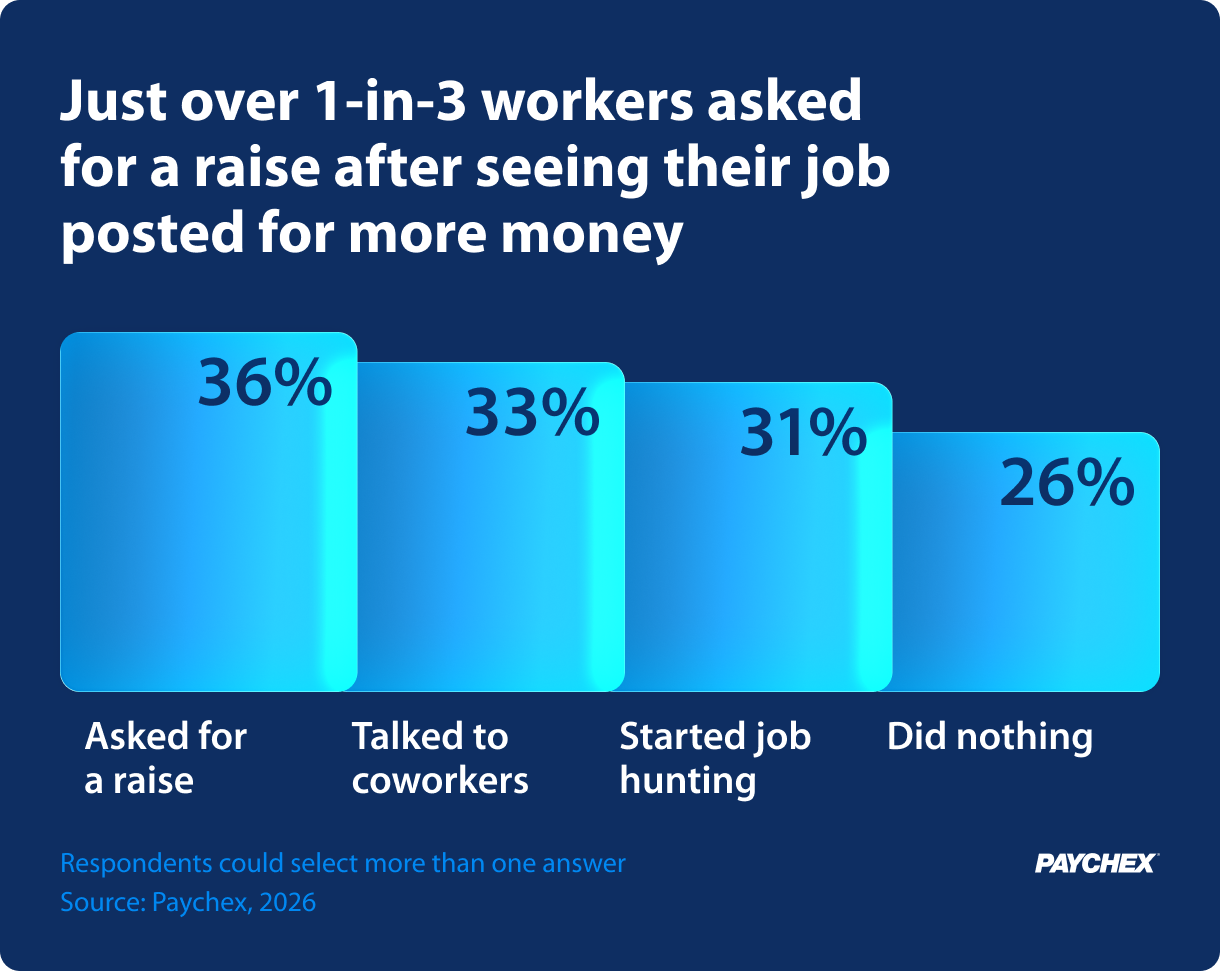
It turns out that many employees are looking. According to Paychex’s Employee Compensation Confidence Index, an anonymous, public survey of 1,034 full-time U.S. employees about their pay conducted online by independent research firm Centiment, 55% have seen the same work they do posted at a higher pay rate than they earn. Most won’t tell you about it, though: 64% didn’t ask for a raise after seeing their role listed at a higher salary, and 31% started looking for a new job instead.
A higher posted range doesn’t always mean an employee is underpaid. But when employees can’t see what explains the difference, the posting shapes how they feel about their pay. Here’s what the data shows about how employees react, and how to respond before a pay question turns into a resignation.
Most Employees Who Spot a Higher Salary Won’t Bring It to You
When employees see their role advertised for more money, few take the question straight to their employer. Just over a third asked for a raise, while others talked to coworkers, started job hunting, or did nothing at all:
That silence could be a retention risk. Employees who’ve seen a higher-paying posting are about twice as likely to have ever quit a job over a pay problem (24% vs. 13%). More broadly, a whopping 61% of those who saw a higher posting have seriously considered leaving over pay, compared with 30% who didn’t.
Where employees see the posting matters, too. Among all employees surveyed, 37% saw a higher-paying posting at another company, and 21% saw one at their current employer. Of those who saw their role posted at their own company, 46% asked for a raise, compared with 30% of those who saw it only at another company. Your own job listings are the hardest postings for current employees to explain away.
Employees under 46 are the most likely to notice, and the youngest are the most likely to act on it. Among employees aged 18 to 29, 64% have seen a higher-paying role, and 42% of those started job hunting as a result. In comparison, 46% of employees aged 46 to 61 have seen a higher-paying role, and only 21% of those started job hunting.
Here’s how to get ahead of these conversations with your employees.
Step 1: Check Current Pay Before You Post a New Range
Before you publish a job listing, compare the posted range with what current employees in the same role earn. If you’re offering new hires more than your existing team, a situation known as pay inversion, the posting shows your current employees exactly how much more. Compare:
- Duties and Scope: Make sure the posted role matches the work current employees do, including team size, budget, and tools. If the new role carries more responsibility, say so clearly in the listing.
- Experience and Credentials: A higher range is easier to justify when the posting requires more experience, a specialized certification, or an advanced degree. Spell out those requirements so employees can see why the range differs.
- Location: A remote posting open to candidates in higher-cost markets like San Francisco or New York City often carries a higher range. If your range is tied to a specific location, state that in the listing.
- Where New Hires Will Likely Land: A wide range draws attention to the top number. If most new hires start near the middle, current employees earning in that band are likely paid competitively, but they need to hear that from you.
If the comparison turns up current employees paid below what you’re offering new hires, adjust their pay before the listing goes live, or be ready to explain your plan to address it.
Step 2: Benchmark Pay Against the Market
Your employees are already researching market pay. Here’s how they check whether their pay is competitive:
- 39% compare pay on job sites or salary apps
- 26% ask people in similar jobs at other companies
- 23% openly discuss pay with coworkers
Use the same sources they do. Collect three to five postings for comparable roles in your local market, and pull wage data for your industry, occupation, and region from the U.S. Bureau of Labor Statistics (BLS). (The most current BLS data, released in May 2026, reflects wages as of May 2025, so factor in market shifts since then.) For a deeper look, here’s how employers benchmark pay.
Then, benchmark on a set schedule, not just when someone asks. Among employees who check their pay, 30% do so only when job hunting, and 26% only when they hear about someone else’s pay.
Step 3: Explain How You Set Pay
Only 21% of employees say their employer shares pay range data with them. When you don’t explain how you set pay, job postings fill in the blanks. You don’t need to publish every salary, but employees should understand:
- Their Pay Range: Share the range for their role and where they fall in it.
- What Moves Pay: Explain which factors lead to raises, such as performance, added responsibilities, certifications, or tenure.
- When Pay is Reviewed: Tell employees when compensation reviews happen so they know when to expect the next conversation.
- Their Total Compensation: Bonuses, commission, retirement contributions, health benefits, and PTO all count. Show employees the full value of what they receive, not just base pay.
You can also expect that employees will talk about pay with each other. Under the National Labor Relations Act, most private-sector employees have a legally protected right to discuss wages, so you generally can’t prohibit those conversations. (The law excludes supervisors, independent contractors, and some other categories of workers.)
Step 4: Prepare Managers for the Raise Conversation
When an employee does bring a higher-paying posting to their manager, how the manager responds affects whether that employee stays. Make sure managers know how to:
- Listen First: Ask which posting the employee saw and what they think it shows. Treat it as one data point, not an ultimatum.
- Compare it Fairly: Walk through duties, experience, location, and total compensation together, using the same criteria from Step 1.
- Give a Clear Answer: If an adjustment is warranted, share the amount and timing. If it isn’t, explain why and what the employee would need to do to qualify.
- Follow Up in Writing: Summarize what was discussed and any next steps, and loop in HR or whoever handles compensation.
Step 5: Offer a Path Forward When You Can’t Raise Pay Now
Budgets don’t always allow for an immediate raise. But a flat no with no next step sends employees back to the job boards. Instead, offer:
- Alternatives to a Base Raise: Consider a one-time bonus, a title change, schedule flexibility, extra PTO, or training and certification support.
- A Timeline: Agree on when you’ll revisit the request and what criteria the employee needs to meet. Put it in writing, then follow through.
Make Pay a Conversation Employees Have With You
Pay transparency laws mean employees will keep seeing what other employers advertise, and most won’t ask you about it first. Reviewing pay before you post a role, benchmarking on a regular schedule, and explaining how you make pay decisions gives employees a reason to bring their questions to you instead of to a recruiter.
Methodology
The survey was conducted online by Centiment for Paychex, with a total sample size of 1,034 full-time employed U.S. adults aged 18 and older. To qualify, each respondent had to be currently employed by an employer (not self-employed or a business owner) and receive a regular paycheck. Fieldwork was undertaken from August 21 to August 31, 2026. Results are weighted to match the U.S. census. The margin of error is approximately ±3% for the overall sample at a 95% confidence level.

Tags